
Your Story, Perfected
The creative workspace where authors plot scenes on a visual canvas, polish prose with a developmental editor on demand, and publish step by step — in the cloud or fully offline, every word stays yours.
From Draft to Bookshelf
The Challenge
Writing a book is hard enough.
Managing characters, timelines, scenes, and edits shouldn't be. Authors juggle dozens of documents, lose track of plot threads, and spend hours on formatting instead of writing. Narrovo brings it all into one place — so you can focus on what matters: the story.
How It Works
Five modes. One workspace.
Narrovo guides you from first outline to launch day — plan your story, write and refine your scenes, run developmental edit rounds, and publish a retail-ready book.
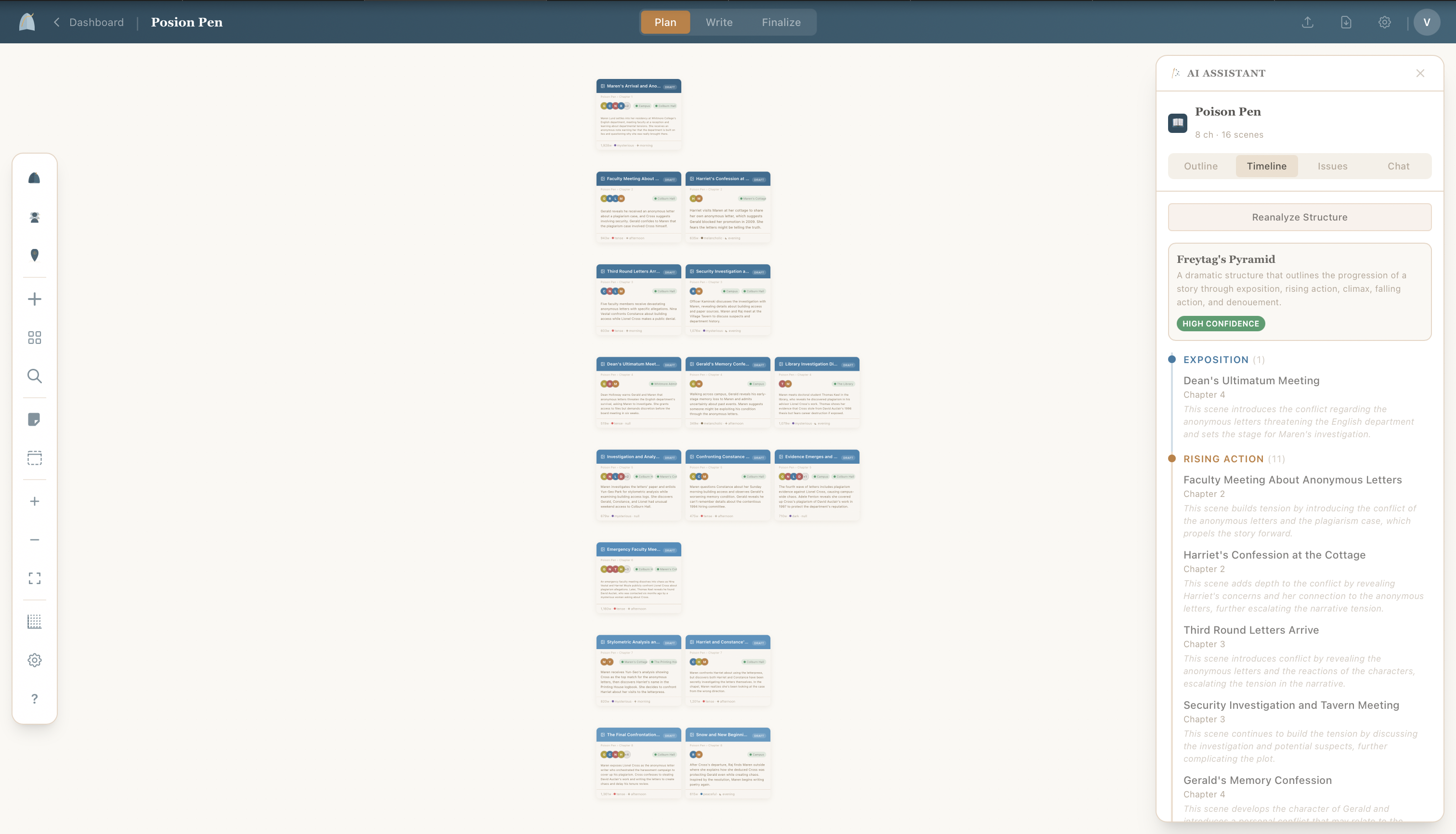
See your entire story at a glance
Arrange books, chapters, scenes, characters, and places on a visual storyboard canvas. Drag cards, draw connections, and zoom in to see the shape of your story before you write a word.
- Drag-and-drop scene, character, and place cards
- Visual connections between story elements
- Chapter-by-chapter organization with color coding
- Collapsible toolbox with scene outlines and timelines
Features
Everything an author needs
One workspace that covers the full journey — from your first character sketch to a polished manuscript.
 Character Profiles
Know Every Character Inside and Out
Build rich character profiles with names, roles, appearance, and personality traits. Characters appear in your editor sidebar and on the canvas, always within reach.
- Detailed character builder
- Linked to scenes automatically
- AI-generated character portraits
 Place Management
Ground Your Story in Vivid Settings
Define the places in your story with descriptions, atmosphere, and reference images. Places link to scenes so you always know where the action happens.
- Atmosphere and mood details
- Linked to scenes on the canvas
- AI-generated location images
 AI Summaries
Keep Track of Every Scene
Generate AI-powered summaries for any scene with one click. Summaries appear on your canvas cards, giving you a bird's-eye view of your entire story.
- One-click summary generation
- Summaries on canvas cards
- Chapter outline view
 AI Scene Reviews
Polish Prose Without Losing Your Voice
Run a full AI review on any scene to get inline suggestions for grammar, pacing, dialogue, and continuity. Accept or dismiss each suggestion individually.
- Grammar and continuity checks
- Dialogue voice analysis
- Inline accept/dismiss workflow
 Multi-Book Projects
Manage an Entire Series
Organize multiple books within one project. Each book has its own chapters and scenes, but characters and places are shared across the series.
- Unlimited books per project
- Shared characters and places
- Color-coded book organization
 Writing Activity
Track Your Progress Like a Pro
See your writing habits at a glance with a yearly heatmap, daily word counts, and streak tracking. Stay motivated and hit your goals — perfect for NaNoWriMo.
- Yearly contribution heatmap
- Daily word count & streak tracking
- Recent activity with bar charts
 Finalize & Export
From Draft to Bookshelf
Preview your book with real page layouts, then export to PDF, DOCX, EPUB, or plain text. Customize typography, margins, and chapter separators.
- PDF, DOCX, EPUB, and TXT export
- Customizable page layout
- Live book preview
AI Developmental EditorAn Editorial Letter for Your Whole Book
Run a developmental edit round and get a full editorial read — structure, character arcs, pacing, and continuity — with scene-level findings backed by evidence. Or run a line edit and apply sentence-level fixes with one click.
- Book- and series-level edit rounds
- Findings linked to your scenes
- One-click line-edit suggestions
 Guided Publishing
Launch Your Book, Step by Step
A publishing wizard that generates your blurb, keywords, categories, and pricing, then walks you through Amazon KDP and IngramSpark — ISBNs, copyright, cover specs, proofs, and launch checklist included.
- AI-generated publishing kit
- KDP and IngramSpark walkthroughs
- Downloadable publish pack
Writing Activity
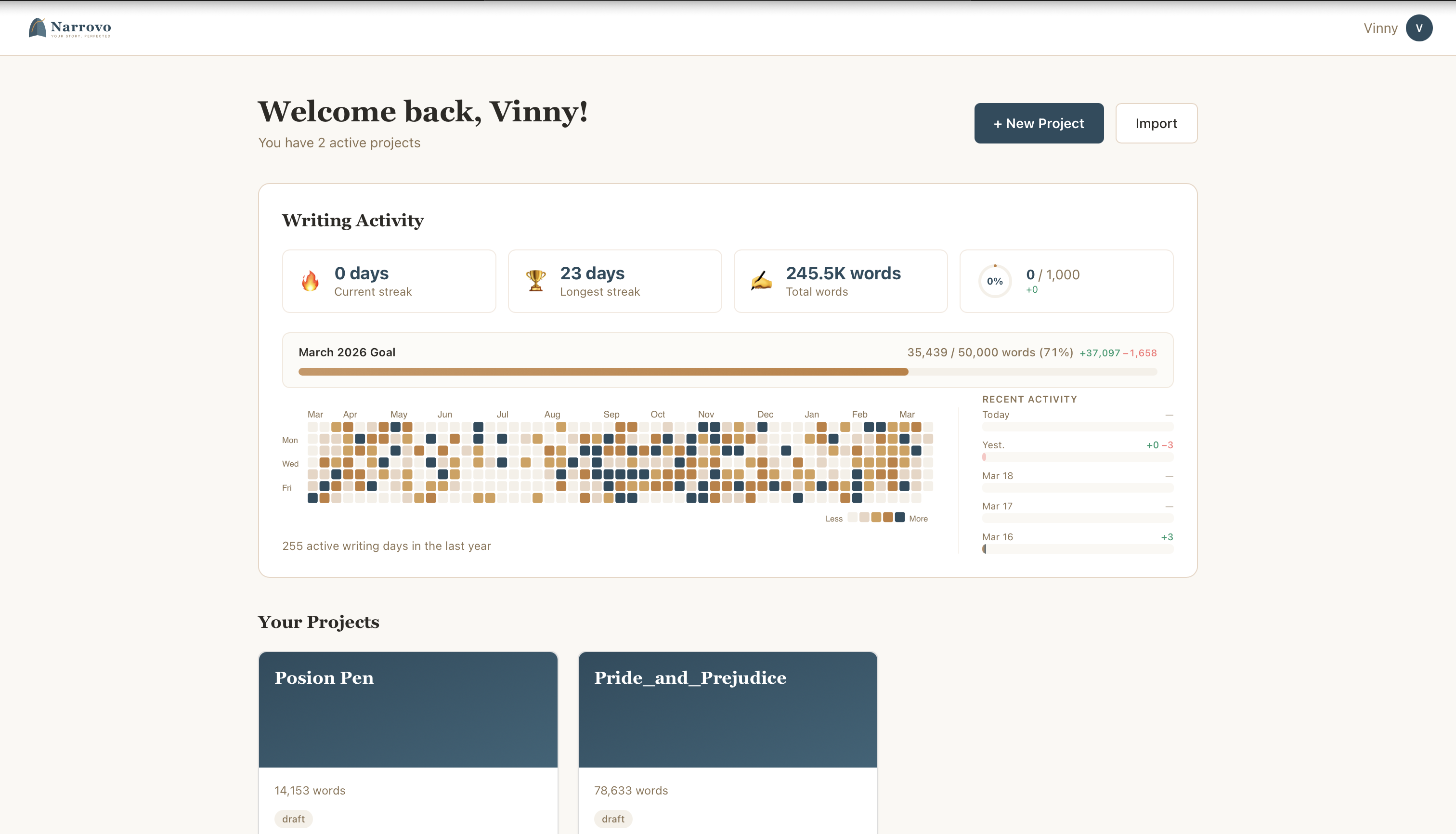
Watch your novel grow, one day at a time
Your personal writing dashboard tracks every word you write. See your habits light up on a heatmap, build unbreakable streaks, and stay on target during NaNoWriMo or any writing challenge.
- Yearly contribution heatmap
- Current & longest writing streaks
- Daily word counts with bar charts
- Automatic tracking — just write
Our AI Philosophy
AI that assists, never writes
Every word belongs to you. Narrovo's AI assistant lives inside your scene editor — it knows your characters, your setting, and your story. It analyzes, suggests, and polishes. It never generates story content or replaces your voice.
AI Does
- Chat with you about your scene in real time
- Check grammar and suggest tighter prose
- Review dialogue for distinct character voices
- Read your whole book and deliver an editorial letter
- Generate scene summaries with one click
- Draft your blurb, keywords, and pricing for launch
AI Does Not
- Write your story or generate content
- Create dialogue or new scenes for you
- Rewrite passages in its own voice
- Replace your creative decisions
- Add anything the author did not write
- Steal your content
- Work without your scene context
Authors Love It
Stories from writers like you
I used to manage my series across 47 Google Docs. Narrovo gave me one canvas where I can see all three books, every character arc, and every plot thread at a glance.
Sarah M.
Self-published fantasy author, 6 books
The continuity checker caught that I changed my protagonist's eye color in chapter 12. That alone saved me from an embarrassing reader email.
James L.
NaNoWriMo participant, debut novel
What I love is that the AI never tries to rewrite my sentences — it just shows me where things could be tighter and lets me decide. It respects my voice.
Priya K.
Literary fiction author
Pricing
Start free. Upgrade when you're ready.
No credit card required for Free. Paid plans include a 14-day free trial.
Free
A fully-featured writing app for your first project.
- 1 project
- Unlimited scenes, characters & places
- Full canvas & scene editor
- TXT & DOCX export
- Writing activity tracking
- Community support
Basic
For authors ready to grow their craft with AI.
- 10 projects
- 100 AI chat messages / month
- 10 AI image generations / month
- 20 AI edit suggestions / month
- 2 book imports / month
- TXT, DOCX, PDF & EPUB export
- 7-day revision history
- 5 manual snapshots per scene
- Full writing stats & streaks
- Email support
Pro
Unlimited everything for serious authors.
- Unlimited projects
- Unlimited AI chat
- Unlimited AI images
- Unlimited AI edits
- Unlimited book imports
- All export formats
- 90-day revision history
- Unlimited snapshots
- Priority support
Ready to bring your story to life?
Join authors who organize, polish, and publish with Narrovo. Start with a free project — no credit card required.